
Friday, February 21, 2014

Monday, February 17, 2014
Show/Hide MS-Access 2007 Navigation Pane
See also:
- http://msdn.microsoft.com/en-us/library/bb256564(v=office.12).aspx
- http://support.microsoft.com/kb/826765/en-us
Put this code into a Module of your Access DB.
Public Sub Secure_database()
' this will require that there is a visible form already displayed!!! With CurrentDb .Properties("AllowShortcutMenus") = False .Properties("AllowFullMenus") = False' .Properties("AllowBreakIntoCode") = False .Properties("AllowShortcutMenus") = False .Properties("AllowSpecialKeys") = False .Properties("StartupshowDBWindow") = False End With DoCmd.Save DoCmd.CloseDatabase End Sub
Public Sub UnSecure_database()
With CurrentDb .Properties("AllowShortcutMenus") = True .Properties("AllowFullMenus") = True '.Properties("AllowBreakIntoCode") = True .Properties("AllowShortcutMenus") = True .Properties("AllowSpecialKeys") = True .Properties("StartupshowDBWindow") = True End With DoCmd.Save DoCmd.CloseDatabase
End Sub
Function ap_DisableShift()'This function disable the shift at startup. This action causes'the Autoexec macro and Startup properties to always be executed.
On Error GoTo errDisableShift
Dim db As DAO.Database Dim prop As DAO.Property Const conPropNotFound = 3270 Set db = CurrentDb() 'This next line disables the shift key on startup. db.Properties("AllowByPassKey") = False 'The function is successful.Exit Function
errDisableShift: 'The first part of this error routine creates the "AllowByPassKey 'property if it does not exist. If Err = conPropNotFound Then Set prop = db.CreateProperty("AllowByPassKey", dbBoolean, False) db.Properties.Append prop Resume Next Else MsgBox "Function 'ap_DisableShift' did not complete successfully." Exit Function End If
End Function
Function ap_EnableShift() 'This function enables the SHIFT key at startup. This action causes 'the Autoexec macro and the Startup properties to be bypassed 'if the user holds down the SHIFT key when the user opens the database. 'If you want to disable the SHIFT key, type ' ap_DisableShift in the Immediate window, and then press ENTER. 'If you want to enable the shift key, type ' ap_EnableShift in the Immediate window, and then press ENTER.
On Error GoTo errEnableShift Dim db As DAO.Database Dim prop As DAO.Property Const conPropNotFound = 3270 Set db = CurrentDb() 'This next line of code disables the SHIFT key on startup. db.Properties("AllowByPassKey") = True 'function successfulExit Function
errEnableShift: 'The first part of this error routine creates the "AllowByPassKey 'property if it does not exist. If Err = conPropNotFound Then Set prop = db.CreateProperty("AllowByPassKey", _ dbBoolean, True) db.Properties.Append prop Resume Next Else MsgBox "Function 'ap_DisableShift' did not complete successfully." Exit Function End If
End Function
Wednesday, February 12, 2014
Find column name in database
--Option #1
-------------------------------------
SELECT name, column_id, *
FROM sys.columns
WHERE object_ID = (
SELECT a.object_id --b.name as 'schema_name'
WHERE object_ID = (
SELECT a.object_id --b.name as 'schema_name'
, a.name
, a.object_id
, a.schema_id
, a.parent_object_id
, a.type
, a.type_desc
, a.create_date
, a.modify_date
FROM sys.objects a INNER JOIN sys.schemas b
ON a.schema_id = b.schema_id
WHERE object_id IN (
select object_ID
from sys.columns
where name like 'snapshot%'
)
AND b.name = 'snapshot'
AND a.name = 'T2_Flatfile_snapshot_level'
--ORDER BY a.[type], b.name, a.name
)
--Option #2
select *
from sys.objects
where object_id IN (select object_ID
)
--Option #2
-------------------------------------
select *from sys.objects
where object_id IN (select object_ID
from sys.columns
where name like '30Day%')
--Option #3
SELECT b.name as 'schema_name'
--Option #3
-------------------------------------
SELECT b.name as 'schema_name' , a.name
, a.object_id
, a.schema_id
, a.parent_object_id
, a.type
, a.type_desc
, a.create_date
, a.modify_date
FROM sys.objects a INNER JOIN sys.schemas b
ON a.schema_id = b.schema_id
WHERE object_id IN ( select object_ID
WHERE object_id IN ( select object_ID
from sys.columns
where name like 'snapshot%')
and b.name = 'snapshot'
and a.name = 'T2_Flatfile_snapshot_level'
and b.name = 'snapshot'
and a.name = 'T2_Flatfile_snapshot_level'
ORDER BY a.[type], b.name, a.name
--Option #4
SELECT b.name as 'schema_name', a.name, a.object_id, a.schema_id
--Option #4
-------------------------------------
SELECT b.name as 'schema_name', a.name, a.object_id, a.schema_id , a.parent_object_id, a.type, a.type_desc, a.create_date
, a.modify_date
FROM sys.objects a INNER JOIN sys.schemas b
FROM sys.objects a INNER JOIN sys.schemas b
ON a.schema_id = b.schema_id
WHERE object_id IN (select object_ID
WHERE object_id IN (select object_ID
from sys.columns
where name like 'snapshot%')
and b.name = 'dbo'
and a.name = 'Flatfile_snapshot'
ORDER BY a.[type], b.name, a.name
SELECT name, column_id FROM sys.columns where object_ID = 109503719
order by 2
union all
SELECT object_id, name, column_id FROM sys.columns where object_ID = 823934257
order by 2
and b.name = 'dbo'
and a.name = 'Flatfile_snapshot'
ORDER BY a.[type], b.name, a.name
SELECT name, column_id FROM sys.columns where object_ID = 109503719
order by 2
union all
SELECT object_id, name, column_id FROM sys.columns where object_ID = 823934257
order by 2
Wednesday, February 5, 2014
The binding status was "DT_NTEXT". The data flow column type is "DBBINDSTATUS_UNSUPPORTEDCONVERSION".
The problem is that the data in that column is longer than 255 characters. If the Jet driver (the code that reads the Excel file for SSIS) detects content in that column larger than that, it presents the data to SSIS as a DT_TEXT or DT_NTEXT data type. SSIS has no control over that behaviour. Changing the "data type" in Excel doesn't exist - you only change data "format"... and that won't help you here, because it's simply a matter of size.
What you have to do is accept that you're getting a DT_NTEXT in to SSIS, which is a "long" string type - a CLOB. In order to "convert" that to a DT_WSTR, you'll need to use a Data Conversion or Derived Column to create a new column with that data. Make sure the column you make has enough room for the incoming data...
Wednesday, January 1, 2014
Find all occurrances of variable declaration
SELECT object_name(object_id)
FROM sys.sql_modules
WHERE definition LIKE '%@EmailId varchar(50)%'
Compare two table definitions
SELECT c.column_id
--, b.name as 'schema_name'
, a.name as 'Table_Name'
, c.name as 'Column_Name'
--, a.object_id
, c.max_length, c.precision, c.scale
--, a.schema_id, a.parent_object_id, a.type, a.type_desc, a.create_date, a.modify_date
into #temp1
FROM sys.columns c INNER JOIN (sys.objects a INNER JOIN sys.schemas b ON a.schema_id = b.schema_id) ON c.object_ID = a.object_id
WHERE a.object_id IN (select object_ID from sys.columns where name like '%snapshot%')
and b.name = 'dbo'
and a.name = 'Flatfile_snapshot'
ORDER BY a.[type], b.name, a.name
SELECT c.column_id
--, b.name as 'schema_name'
, a.name as 'Table_Name'
, c.name as 'Column_Name'
--, a.object_id
, c.max_length, c.precision, c.scale
--, a.schema_id, a.parent_object_id, a.type, a.type_desc, a.create_date, a.modify_date
into #temp2
FROM sys.columns c INNER JOIN (sys.objects a INNER JOIN sys.schemas b ON a.schema_id = b.schema_id) ON c.object_ID = a.object_id
WHERE
--a.object_id IN (select object_ID from sys.columns where name like '%snapshot%')
b.name = 'dbo'
and a.name = 'FlatFile_snapshot_MonthlyHC'
ORDER BY a.[type], b.name, a.name
--select * from #temp1
--select * from #temp2
SELECT a.column_id, a.column_name, a.max_length, a.precision, a.scale
, b.column_id, b.column_name, b.max_length, b.precision, b.scale
, a.max_length - b.max_length
FROM #temp1 a INNER JOIN #temp2 b ON a.column_name = b.column_name
--HAVING a.max_length - b.max_length <> 0
ORDER BY a.column_id
drop table #temp1
drop table #temp2
Thursday, December 19, 2013

Sunday, December 15, 2013
List of database Constraints
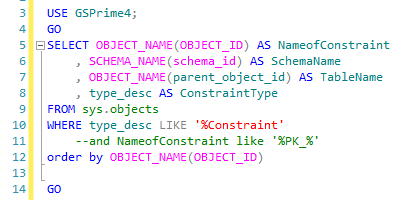
USE GSPrime4;
GO
SELECT OBJECT_NAME(OBJECT_ID) AS NameofConstraint
, SCHEMA_NAME(schema_id) AS SchemaName
, OBJECT_NAME(parent_object_id) AS TableName
, type_desc AS ConstraintType
FROM sys.objects
WHERE type_desc LIKE '%Constraint'
--and NameofConstraint like '%PK_%'
order by OBJECT_NAME(OBJECT_ID)
GO
Monday, December 2, 2013
Select text to left of @
SELECT userID, emailID, left(emailId, charindex('@',emailId)-1)
FROM [TaxFormsDelivery].[dbo].[TFDP_Client_Users]
where UserID = left(emailId, charindex('@',emailId)-1)
Subscribe to:
Posts (Atom)