Wednesday, February 5, 2014

The binding status was "DT_NTEXT". The data flow column type is "DBBINDSTATUS_UNSUPPORTEDCONVERSION".


The problem is that the data in that column is longer than 255 characters.  If the Jet driver (the code that reads the Excel file for SSIS) detects content in that column larger than that, it presents the data to SSIS as a DT_TEXT or DT_NTEXT data type.  SSIS has no control over that behaviour.  Changing the "data type" in Excel doesn't exist - you only change data "format"... and that won't help you here, because it's simply a matter of size.
What you have to do is accept that you're getting a DT_NTEXT in to SSIS, which is a "long" string type - a CLOB.  In order to "convert" that to a DT_WSTR, you'll need to use a Data Conversion or Derived Column to create a new column with that data.  Make sure the column you make has enough room for the incoming data...

Wednesday, January 1, 2014

Find all occurrances of variable declaration


SELECT object_name(object_id)
FROM sys.sql_modules
WHERE definition LIKE '%@EmailId varchar(50)%'


Compare two table definitions


 SELECT c.column_id
--, b.name as 'schema_name'
, a.name as 'Table_Name'
, c.name as 'Column_Name'
--, a.object_id
, c.max_length, c.precision, c.scale
--, a.schema_id, a.parent_object_id, a.type, a.type_desc, a.create_date, a.modify_date
into #temp1
 FROM sys.columns c INNER JOIN (sys.objects a INNER JOIN sys.schemas b ON a.schema_id = b.schema_id) ON c.object_ID = a.object_id
 WHERE a.object_id IN (select object_ID from sys.columns where name like '%snapshot%')
  and b.name = 'dbo'
  and a.name = 'Flatfile_snapshot'
 ORDER BY a.[type], b.name, a.name

 SELECT c.column_id
--, b.name as 'schema_name'
, a.name as 'Table_Name'
, c.name as 'Column_Name'
--, a.object_id
, c.max_length, c.precision, c.scale
--, a.schema_id, a.parent_object_id, a.type, a.type_desc, a.create_date, a.modify_date
into #temp2
 FROM sys.columns c INNER JOIN (sys.objects a INNER JOIN sys.schemas b ON a.schema_id = b.schema_id) ON c.object_ID = a.object_id
 WHERE 
--a.object_id IN (select object_ID from sys.columns where name like '%snapshot%')
b.name = 'dbo'
  and a.name = 'FlatFile_snapshot_MonthlyHC'
 ORDER BY a.[type], b.name, a.name

 --select * from #temp1
 --select * from #temp2

 SELECT a.column_id, a.column_name, a.max_length, a.precision, a.scale
, b.column_id, b.column_name, b.max_length, b.precision, b.scale
, a.max_length - b.max_length
 FROM #temp1 a INNER JOIN #temp2 b ON a.column_name = b.column_name
 --HAVING a.max_length - b.max_length <> 0
 ORDER BY a.column_id

 drop table #temp1
 drop table #temp2

Sunday, December 15, 2013

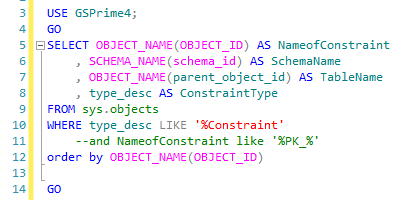
List of database Constraints


USE GSPrime4;
GO
SELECT OBJECT_NAME(OBJECT_ID) AS NameofConstraint
, SCHEMA_NAME(schema_id) AS SchemaName
, OBJECT_NAME(parent_object_id) AS TableName
, type_desc AS ConstraintType
FROM sys.objects
WHERE type_desc LIKE '%Constraint'
--and NameofConstraint like '%PK_%'
order by OBJECT_NAME(OBJECT_ID)

GO

Monday, December 2, 2013

Select text to left of @


SELECT userID, emailID, left(emailId, charindex('@',emailId)-1)
  FROM [TaxFormsDelivery].[dbo].[TFDP_Client_Users]
  where UserID  = left(emailId, charindex('@',emailId)-1)

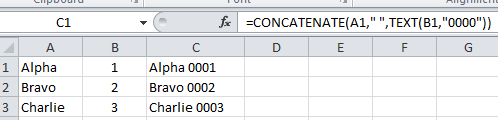
Excel CONCATENATE and TEXT functions


=CONCATENATE(A1," ",TEXT(B1,"0000"))

Tuesday, November 12, 2013

Fragmentation of Views

SELECT DB_NAME() [database], OBJECT_NAME(a.object_id) [table], idx.[name], a.object_id, a.index_id, a.index_type_desc, a.alloc_unit_type_desc, avg_fragmentation_in_percent, a.page_count
FROM sys.dm_db_index_physical_stats(DB_ID(), NULL, NULL, NULL, 'SAMPLED') a
JOIN sys.indexes idx ON idx.object_id = a.object_id AND idx.index_id = a.index_id
WHERE page_count > 1000
AND avg_fragmentation_in_percent > 10.0
ORDER BY avg_fragmentation_in_percent DESC

Monday, November 11, 2013

SQL Server Transaction example

USE AdventureWorks;
GO
BEGIN TRANSACTION;

BEGIN TRY
    -- Generate a constraint violation error.
    DELETE FROM Production.Product
    WHERE ProductID = 980;
END TRY
BEGIN CATCH
    SELECT 
        ERROR_NUMBER() AS ErrorNumber
        ,ERROR_SEVERITY() AS ErrorSeverity
        ,ERROR_STATE() AS ErrorState
        ,ERROR_PROCEDURE() AS ErrorProcedure
        ,ERROR_LINE() AS ErrorLine
        ,ERROR_MESSAGE() AS ErrorMessage;

    IF @@TRANCOUNT > 0
        ROLLBACK TRANSACTION;
END CATCH;

IF @@TRANCOUNT > 0
    COMMIT TRANSACTION;
GO

Friday, November 1, 2013

Calculating execution frequency

METHOD #1


USE [databasename]
GO
CREATE PROCEDURE procExecutionFrequency  @Database sysnameASBEGIN SELECT cp.objtype 'ObjectType' , min(DB_NAME(st.dbid)) +'.'+OBJECT_SCHEMA_NAME(st.objectid,dbid) +'.' +OBJECT_NAME(st.objectid,dbid) 'ObjectName' , max(cp.usecounts) 'ExecutionFrequency' FROM sys.dm_exec_cached_plans cp CROSS APPLY sys.dm_exec_sql_text(cp.plan_handle) st WHERE cp.objtype in ( 'proc', 'view')  AND DB_NAME(st.dbid) = @Database GROUP BY   cp.objtype,   cp.plan_handle,   OBJECT_SCHEMA_NAME(objectid,st.dbid),   OBJECT_NAME(objectid,st.dbid)  ORDER BY ObjectType, ExecutionFrequency descENDGO
EXEC procExecutionFrequency 'GSPrime4'
GO
---------------------------------------------------------------------

METHOD #2

CREATE TABLE dbo.tblRTPVrequests (
rtpvID int IDENTITY (1, 1) NOT NULL ,
rtpvDateTime datetime ,

CONSTRAINT PK_RTPVrequests PRIMARY KEY CLUSTERED ( rtpvID )
)
GO

--update the counter
insert into dbo.tblRTPVrequests values(getdate())
select * from dbo.tblRTPVrequests